
fp_wcs_api missing as a descriptor from the project

Trying to build the android sdk project. getting the following error
Error: Project: 2players declares a dependency from configuration 'compile' to configuration 'default' which is not declared in the descriptor for project: fp_wcs_api.
Can you please help me on this?
Followed the steps from 1 to 6 from https://flashphoner.com/docs/wcs5/w...uide-2/index.html?quick_start_android_sdk.htm but don't seem to get the correct issue regarding the same. Any insight on this would be really helpful.
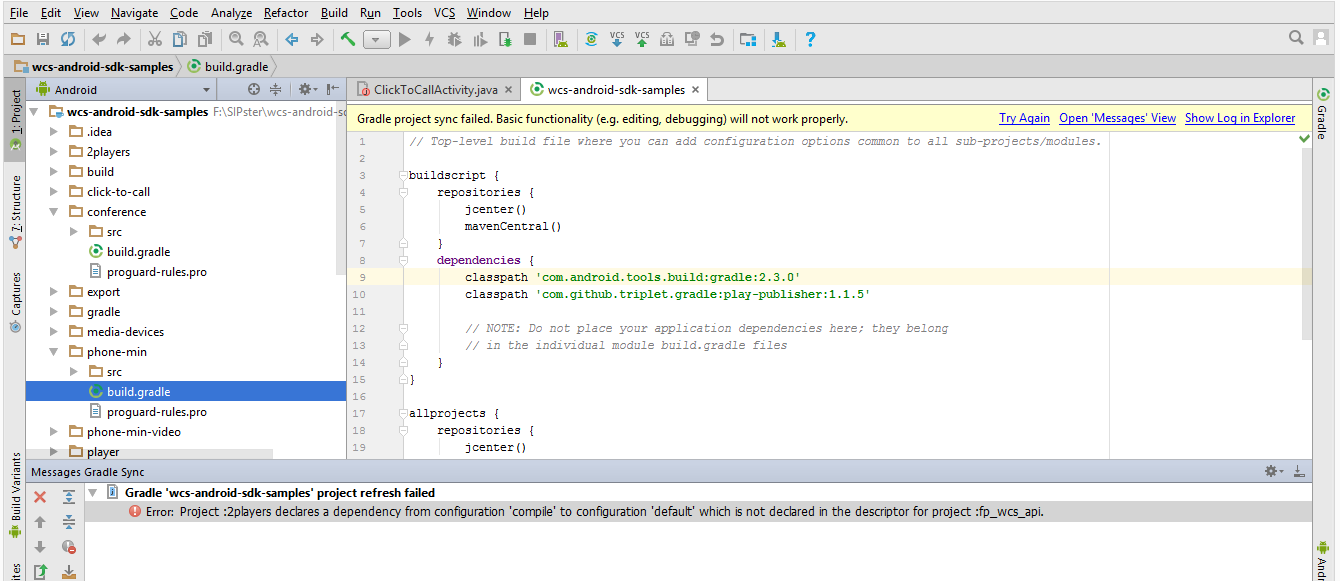
upload_2017-4-16_1-59-25-png.199
 
Hello
Please use procedure described here steps 1-6.
Make sure
1. You made export
Code:
./export.sh wcs-android-sdk-1.0.1.2.aar
2. Your working dir is output
As I can see from your screenshot, you open folder wcs-android-sdk-samples in the Android Studio.
But to get this working, you have to open folder output in the Android Studio.
 
Code:
cd export
./export.sh wcs-android-sdk-1.0.1.2.aar
The export.sh script will create folder output with working configuration.
wcs-android-sdk-1.0.1.2.aar - here you have to use your own version of aar file.
 
Hi Max,
Thank you for the response. Can you please explain about the step where I run ./export.sh wcs-android-sdk-1.0.1.12.aar. I am running the same on the windows cmd, hence I will be running export.sh wcs-sndroid-sdk-2.0.2.3.aar. Also, the following screenshot gives the description about the project run with the folder export in android studio.
upload_2017-4-16_3-57-49.png

Here it seems that the build is fine but after running the project I don't see the project being created with the .apk file in the /libs/ wcs-android-sdk-1.0.1.2.aar.Can you let me know if there is a proper documentation for the same?
upload_2017-4-16_4-0-52.png

Can you help me regarding the same?
 
This is a Linux bash script.
So you have to run this script on a Linux machine.
Then you will be able to download output folder generated by this script and open this folder in Android Studio.
 
Top