Embed video is asking for Java?

Thanks for check this men, I´m changing my encoder, from Mpeg-TS to SRT, I think this could help with the packet loss thing.
Anyway I´ve been messing around with the certificates and I think I´ve supercrash the WCS on this instance.
I´m begining a clean install from zero. I´ll tell about when everything works.
Thanks!!,
Vico
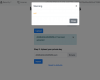
 
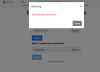
Hey!, men, I´m trynig the certificate thing, I download the .crts and .pem from godaddy but i´m getting this...
 

Attachments

  • Screen Shot 2020-06-10 at 17.07.58.png
    Screen Shot 2020-06-10 at 17.07.58.png
    73.2 KB · Views: 558
We tried to import certificate files you've provided. Seem like private key file is not a private key, or it is in wrong format, but it cannot be parsed neither WCS nor openssl (we tried to use keytool way also). So please ask you SSL provider to fix the file.
 
Yep, they give me a private Key in .txt format, I´m asking now for other formats but no answers from GoDaddy at this moment.
I´m sending also the .txt to support (flashphoner) but I thing the problem is the fromat itself.
Anyway I´m trying again the cerbot way, I´m stuck when ask me for a webroot because I´m tied on the Wix uncomfortable thing, this is the point I need to change.
Thanks men.
 
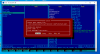
Hi super Max, I made a mistake and ask for help in other thread, sorry for this.
I done the Cerbot way and everythig goes well, but I´m stuck becouse I can´t access the /letsencrypt/live folder.
I´ve try stopping WCS, by SSH or Ftp and I have no permissions to access there.
Do you know the way?

Thanks again men!!,
Vico
 

Attachments

  • Screen Shot 2020-06-14 at 23.34.43.png
    Screen Shot 2020-06-14 at 23.34.43.png
    134.6 KB · Views: 518
Good day.
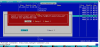
To copy files from/to system configuration folders, you should use cp command or Midnight Commander mc with sudo privilegies (this is included to WCS AMI). For example, copy /etc/letsencrypt/live folder to you home dir
Code:
sudo cp -r /etc/letsencrypt/live .
Then, all the files in this folder should be accessible
 
Good day!
No success, sorry. with cp or mc the folder is copied to the ec2-user dir but the files are not accesibles, original live or copied.

Sorry men, I really close to despair here.
 
No success, sorry. with cp or mc the folder is copied to the ec2-user dir but the files are not accesibles, original live or copied.
When file is copied to /home/ec2-user, you can change access mode to 777, and it should be available:
Code:
sudo cp -r /etc/letsencrypt/live .
sudo chmod -R 777 ./live
 
Thanks Max, now I can access "live" and see the .pems but once again not allowing me to download nothing.
Trying to get the whole "live" folder, only the README file is copied.
 

Attachments

  • Screen Shot 2020-06-15 at 08.53.43.png
    Screen Shot 2020-06-15 at 08.53.43.png
    120.3 KB · Views: 572
Last edited:
Please pack the folder to tar.gz arhive, then download and unpack it
Code:
tar -czf ./live live.tar.gz
 
Thanks Max, but once again the files don´t wanna nothing

also try simple tar:
[ec2-user@ip-xxxxxxxxxxxxx letsencrypt]$ tar -c live
tar: live: Cannot open: Permission denied
 

Attachments

  • Screen Shot 2020-06-15 at 13.33.35.png
    Screen Shot 2020-06-15 at 13.33.35.png
    48.1 KB · Views: 522
No luck, I´m close to surrender men.
only the README it´s copied again.
 

Attachments

  • Screen Shot 2020-06-15 at 17.27.45.png
    Screen Shot 2020-06-15 at 17.27.45.png
    55.9 KB · Views: 559
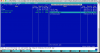
Seems like you're trying to copy/archive symlinks. So, please follow the links and copy files from ther original location. You can use ls command to follow the symlinks
Code:
ls -l /etc/letsencrypt/live/your_domail
In this case, you could copy original files using SFTP client without intermediate copying to home folder
We usually recommend to use Far Manager as SFTP client on Windows, it can resolve symlinks automatically. Try Double Commander on Mac, it can also be used as SFTP client.
 
Hi there!, I know that I´m close to finish the integration and the players will be ready some day, but men, this is driven me crazy.
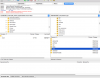
I try all this ways, on PC and Mac, again I can´t download the certificates. I´m login with FarManager as ec2-user, I don´t know how to have privileges there... or maybe it´s another thing.
Thanks for your patience
 

Attachments

  • Screen Shot 2020-06-16 at 17.24.47.png
    Screen Shot 2020-06-16 at 17.24.47.png
    34.5 KB · Views: 499
  • Captura de Pantalla.png
    Captura de Pantalla.png
    121.4 KB · Views: 530
According to screenshot you provided, you should go to /etc/letsencrypt/archive/your_domain/ folder and grap certificate files from it.
 
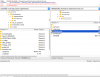
Thanks men, I´m even close but... the fullchain1.pem have only 45bites now.
And the WCS not load this.
I´m gonna start a new clean install from zero, maybe I mess this in some point, but I remember clearly not touching this folder...
 

Attachments

  • Screen Shot 2020-06-17 at 09.17.01.png
    Screen Shot 2020-06-17 at 09.17.01.png
    75.3 KB · Views: 478
  • Screen Shot 2020-06-17 at 09.16.53.png
    Screen Shot 2020-06-17 at 09.16.53.png
    58.9 KB · Views: 468
Thanks men, I´m even close but... the fullchain1.pem have only 45bites now.
This is symlink again. Please check where it points to
Code:
ls -l fullchain1.pem
then grab original file from there
Or just enable Resolve symbolic links switch in NetBox connection settings
1592379782135.png
 
Top